
 1/7
1/7A broker offers $2,000 for a 780-mile run and wants an answer in ten minutes. Open Load Costing, enter the miles and your costs, and see your break-even and target charge before you say yes.
Included in: PremiumBuilt for small fleets
Built for small trucking companies
LogiMove: Know Which Loads Actually Make Money
Loads + Fuel + IFTA + Receivables + Profit Per Mile, in one Excel file
- See revenue, cost and profit on every load, and per mile
- Log loads, fuel and expenses once. The Dashboard does the math
- IFTA gallons by state, ready at quarter end
- Pro and Premium add receivables, truck profit, maintenance and load costing
- Excel 2016+ and Microsoft 365. One payment, no login, no monthly fee
Save up to 22% on every plan
Regular prices apply after Oct 31 at 11:59 PM ET.
---CHOOSE YOUR PLAN---
Included with every plan
- User manual for your tier, with a screenshot of every tab
- Pro: + Pre-Trip & DOT Checklist, Broker Collections Playbook
- Premium: + Load Quote Cheat Sheet, Driver Pay & Settlement Guide




Secure checkout by Whop. US dollars, one-time, no subscription.
30-day money-back guarantee
Run a real load through it. Not clearer on profit, fuel and collections? Email us within 30 days for a refund. See the Refund Policy.
What's in the workbook
Connected tabs that feed each other. Basic: Start Here, Settings, Dashboard, Calendar, Load Log, Fuel Log, Expenses and IFTA. Pro adds Vehicle Profit, Receivables and Maintenance. Premium adds Fleet KPI, Load Costing, Driver Performance and Cash Flow. White cells are where you type. Light blue-gray cells calculate on their own, so don't type over them.
How the daily routine works
Add each load on the Load Log with its route, miles, revenue and costs. Log each fill-up on the Fuel Log with the state. Record other costs on Expenses. The Dashboard, profit and margin on every load update themselves, so you never touch a formula. Ten minutes a day is enough.
What the Dashboard shows
Total revenue, expenses, net profit and margin for the month or year you pick, with revenue per mile and profit per mile. Plus your total loads, your next scheduled load, a revenue-vs-expenses chart, an expense breakdown and your most recent loads. Pro and Premium add receivables and maintenance alerts.
How IFTA works in the file
You log each fuel purchase with its state and gallons. On the IFTA tab you pick the year and quarter, enter the miles you drove in each state, and LogiMove shows gallons purchased by state, fleet MPG, taxable gallons and net taxable gallons. It organizes your numbers. It does not know your tax rates or file your return.
Compatibility
Made for Microsoft Excel 2016 or newer and Microsoft 365. No macros, no add-ins. Google Sheets can open .xlsx files, but LogiMove is designed and tested for Excel, so some formatting and charts may not display as intended in Sheets.
- Built for ExcelExcel 2016+ and Microsoft 365
- $0 per monthOne payment, the file is yours
- 30-day refundTry it on a real load
- No macrosPlain .xlsx, no add-ins
- 5,000 rowsRoom in every log
- Instant downloadLink emailed in minutes
The cost of running on gut
You can haul a full load and still lose money on it.
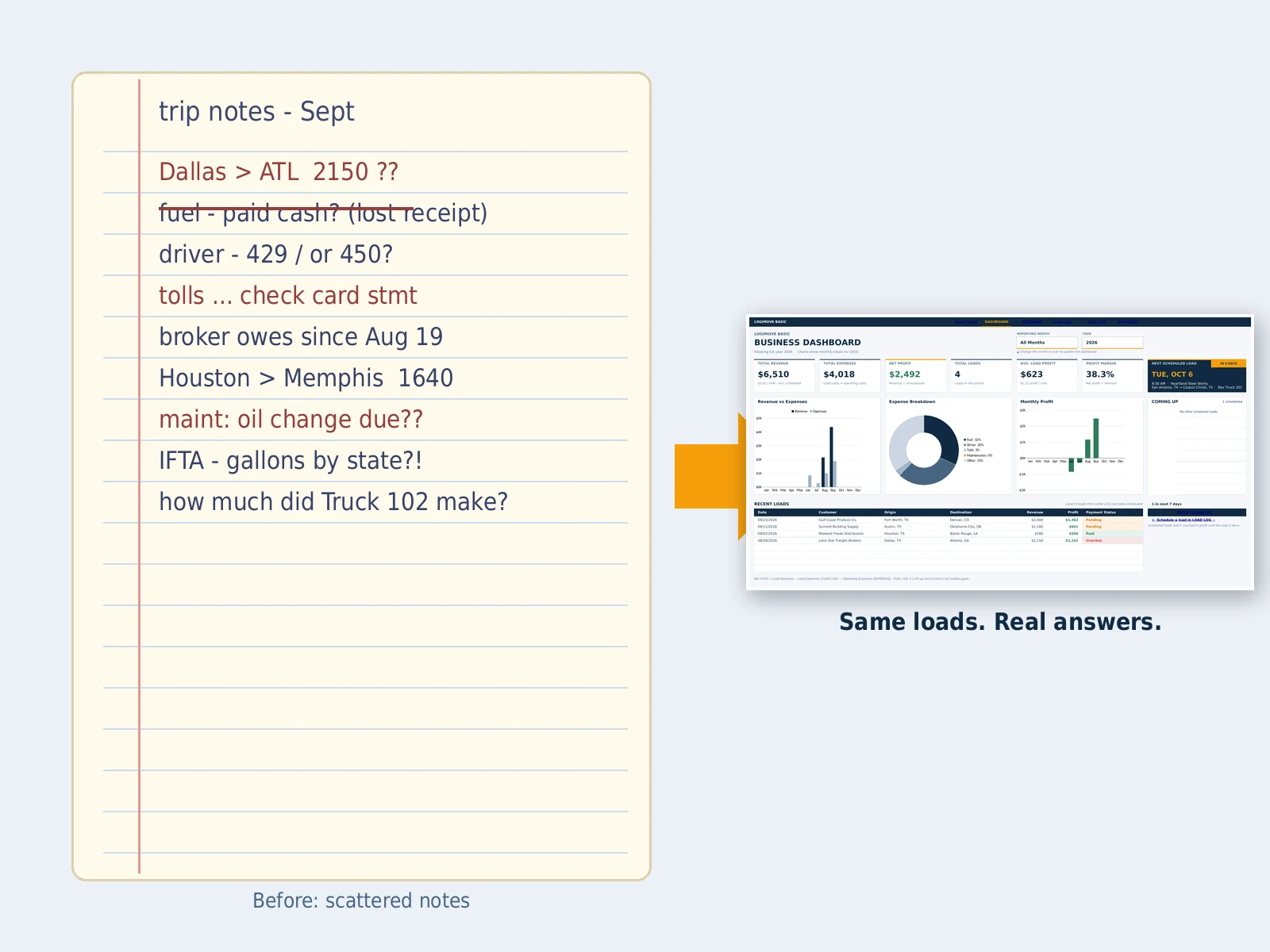
Most small fleets don't lose money because they can't drive. They lose it in the gaps: a rate that looked like $2.80 a mile and was really $2.10 once the empty miles were counted, fuel receipts that never made it into a sheet, a broker who pays in 45 days while the truck payment is due in 30, a repair that quietly wiped out the profit on three loads. None of it feels big on the day. All of it shows up at quarter end, when IFTA is due and you can't explain where the money went.
LogiMove gives you the answer after every load. Enter the route, miles, revenue and the costs that belong to the load, and see profit, margin and profit per mile right away. Log fuel with the state and gallons, and the IFTA tab totals them for you. Then watch the Dashboard show what each month really made.
No dispatch software to learn. No per-truck fee. No monthly bill that keeps coming when freight slows down. One Excel file, one payment, and a straight answer to the question that decides whether a load was worth running.
What you get
This is what you'll see inside LogiMove.
Real screens from the workbook, filled with sample loads. Enter a load once and it flows into your dashboard, receivables and profit-per-mile numbers. Sample numbers are for illustration only.
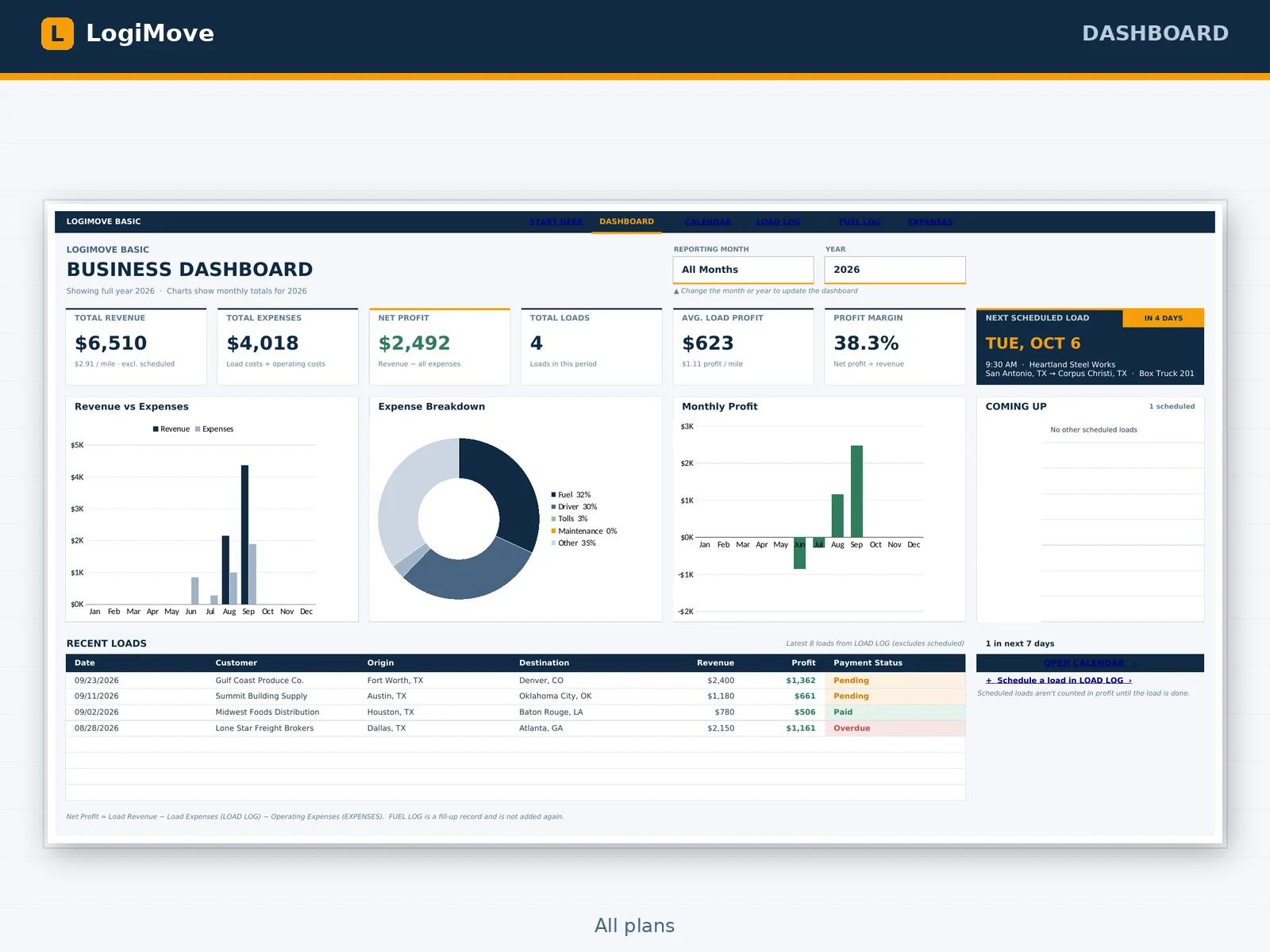
Dashboard
All plansRevenue, expenses, net profit and margin for any month or the full year, with revenue per mile and profit per mile right on the cards. Plus your next scheduled load.
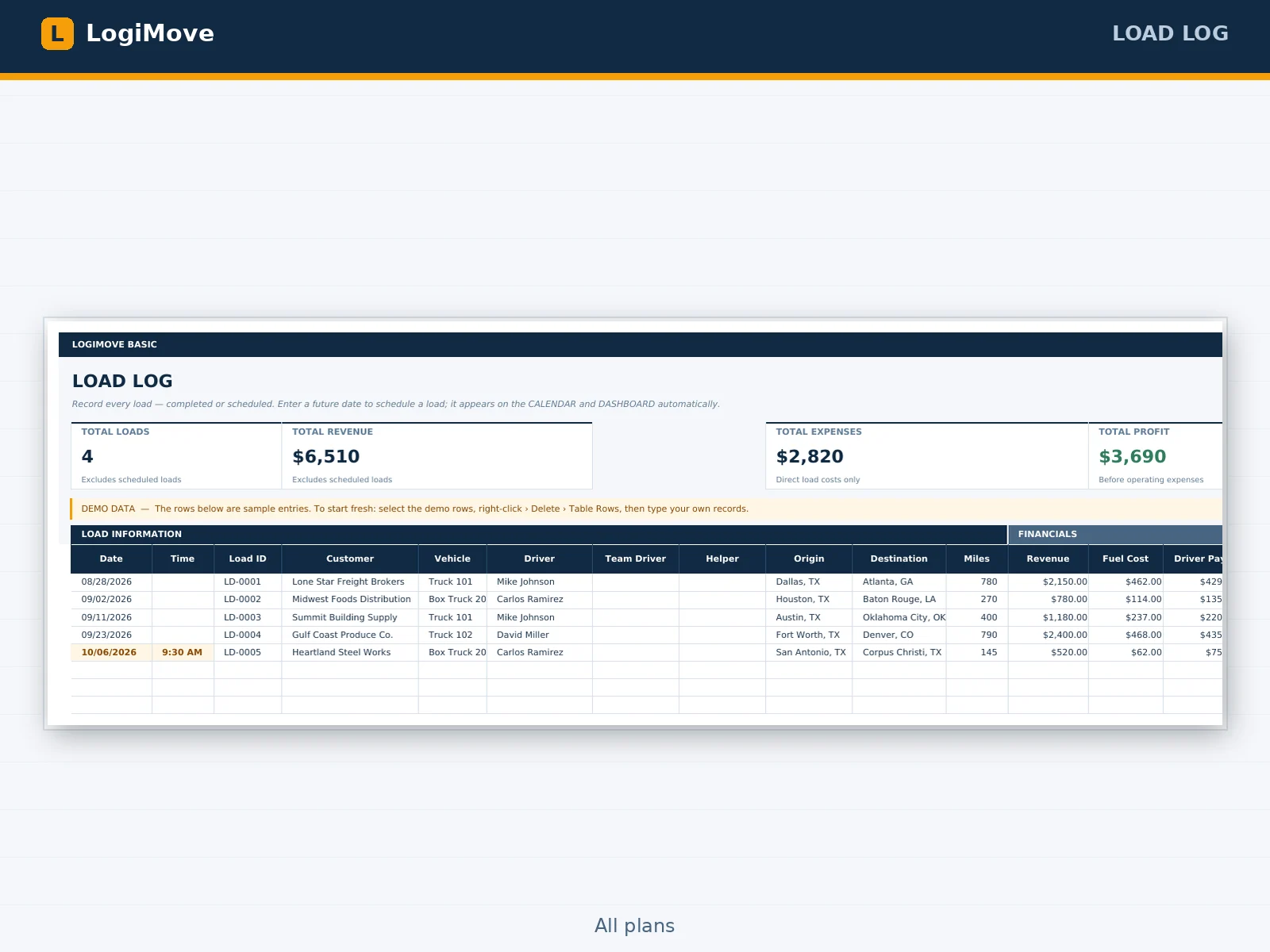
Load Log
All plansOne row per load: customer, route, miles, revenue, fuel, driver pay and tolls. Profit and margin fill in themselves, and future dates become scheduled loads.
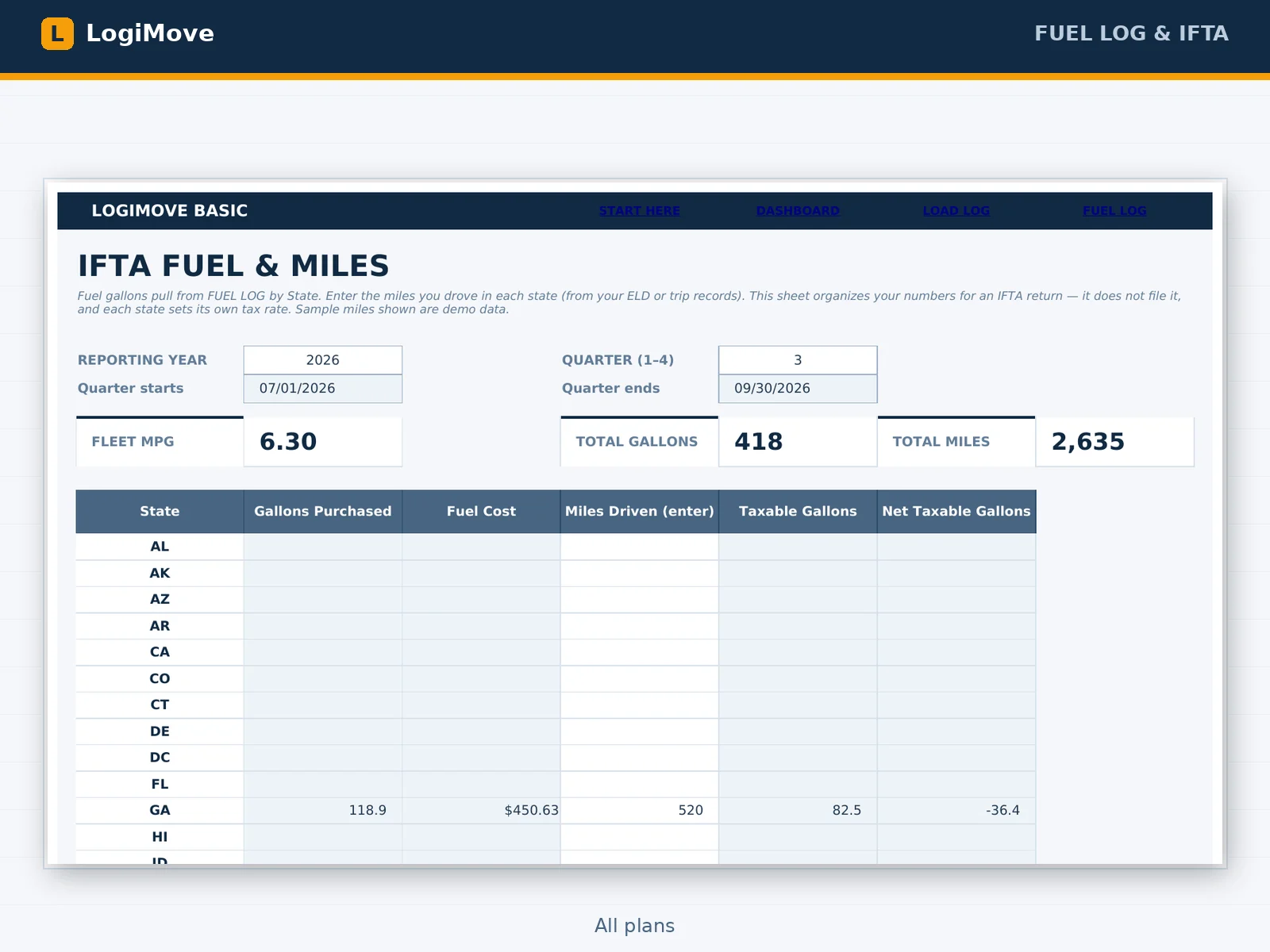
Fuel Log + IFTA
All plansLog each fill-up with the state, gallons and price. The IFTA tab totals gallons by state for any quarter, works out fleet MPG and taxable gallons, and leaves the filing to you.
Receivables
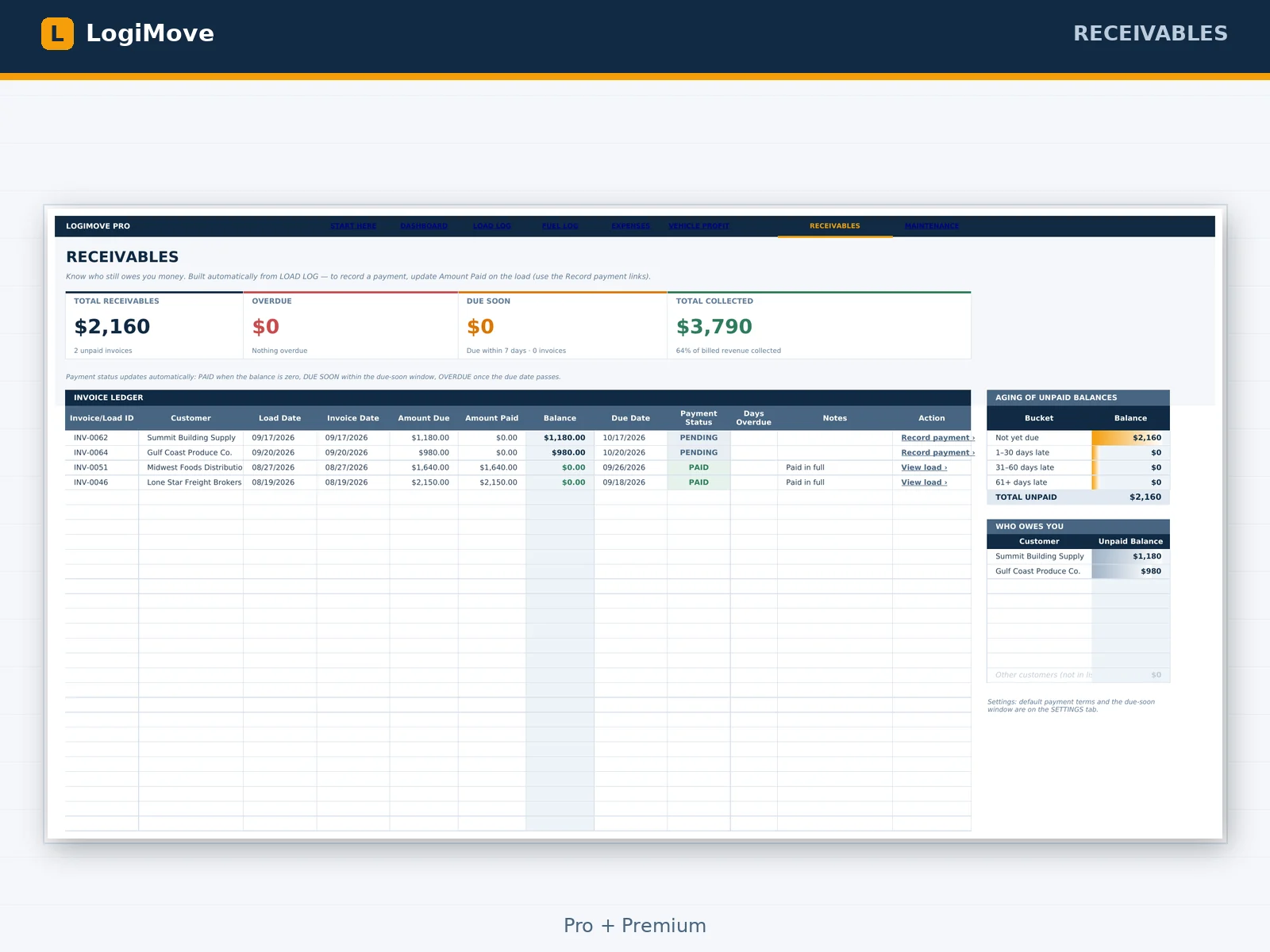
Pro + PremiumSee who owes you, how late it is and how much. Aging buckets, who owes you, and a one-click link to record the payment.
Vehicle Profit
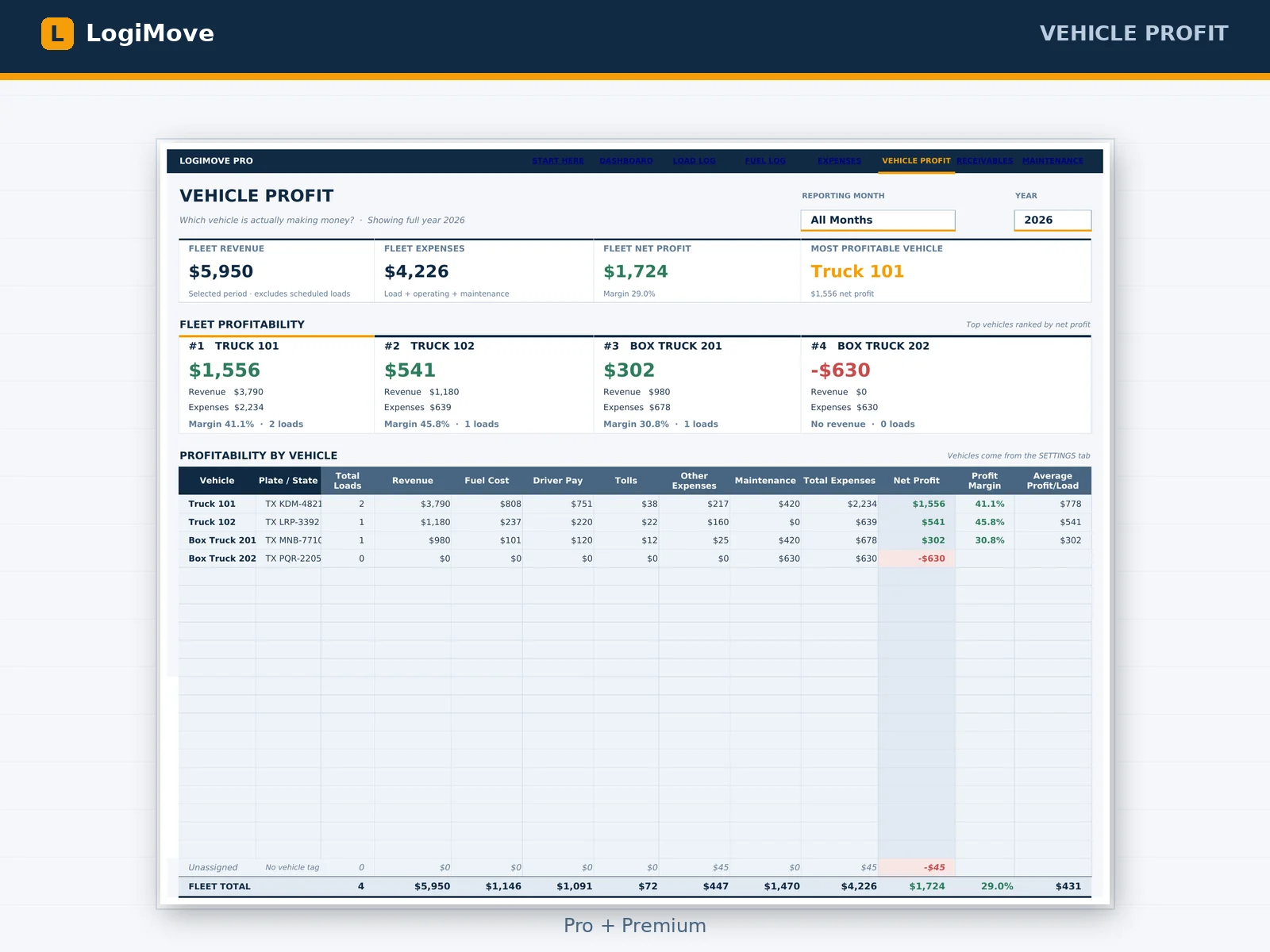
Pro + PremiumNet profit by truck: fuel, driver pay, tolls, maintenance and the rest on one row, so you know which unit earns its keep.
Load Costing
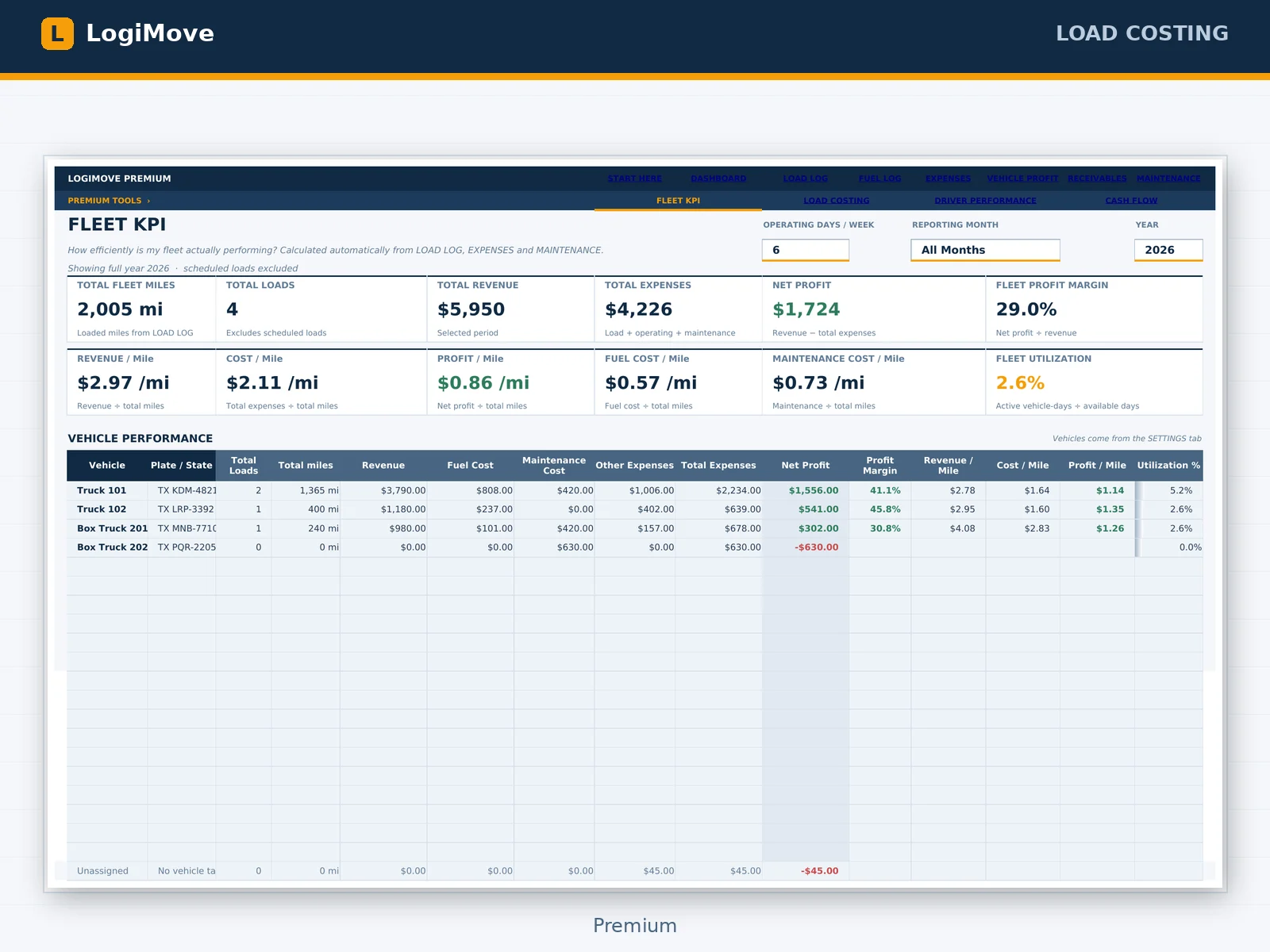
PremiumEnter the miles, MPG, fuel price and costs. Get your break-even, your target charge and whether the broker's offer is worth taking.
A clear fit matters
Is LogiMove right for your trucking company?
It's intentionally focused. Here's what it's built to do, and what it's not.
Built for you if…
- You quote loads off a gut feel, a rate-per-mile you've never checked, or whatever the broker offers
- You want to know your real cost per mile, including empty miles, before you say yes
- Fuel, driver pay and tolls are scattered across receipts, card statements and notes
- You bill brokers and customers and lose track of who owes what and for how long
- You need gallons and miles by state ready when the IFTA quarter closes
- You run one to ten trucks and don't need enterprise software
- You're fine typing in Excel with a short guide
Choose something else if…
- ✕You need multi-user cloud access, role permissions or a mobile app
- ✕You need dispatch, GPS tracking, hours-of-service logs or an ELD
- ✕You need integrated accounting, payroll, or tax and IFTA filing (LogiMove organizes the numbers, it doesn't file them)
If the core version is what you need, start with Basic at $199 and use the 30-day refund window to test it on your real loads.
Loaded miles are not all your miles
A $2.80 rate is really $2.41 once the empty miles count.
That gap is where a lot of trucking profit disappears, before fuel, repairs and slow payers. LogiMove tracks revenue and cost per mile so you can see it, and Load Costing prices a load to the margin you choose.
| Rate per loaded mile | With 16% empty miles |
|---|---|
| $2.80 / loaded mile | $2.41 / mile |
| $2.50 / loaded mile | $2.15 / mile |
| $2.20 / loaded mile | $1.89 / mile |
| $2.00 / loaded mile | $1.72 / mile |
Example: 500 loaded miles plus 80 empty miles. Rate ÷ (loaded + empty miles). Illustrative math, not a guarantee of results.
A practical starting point
From running on gut to knowing your real cost per mile.
- 1
Day 1
Open the file, clear the sample data, and enter your trucks, drivers and customers on Settings. Add your first load, log your last fill-up, and check the Dashboard the same day.
- 2
Week 1
Enter each load and each fuel receipt the day it happens. Profit and margin update on every load, so you see a lane that doesn't pay while there's still time to say no to it.
- 3
Month 1
Open the Dashboard and see revenue, expenses, profit and revenue per mile. If you have Pro, open Receivables and see who owes you and how late. At quarter end, the IFTA tab already has your gallons by state.
- 4
Load 50 and up
Your numbers come from real loads, not memory. You know your cost per mile, your best lanes and which brokers pay slowly. You stop saying yes to loads blind, because you can see what each one is worth.
The simple promise
Clarity without another monthly bill.
Compare plans
Pick the tier that matches how you run loads.
Every plan is a one-time payment. If you outgrow your tier, existing customers can upgrade for less than the price difference.
| What's included | Basic For owner-operators $199 $249 | Pro For small fleets Most Popular$399 $499 | Premium For growing carriers Best Value$699 $899 |
|---|---|---|---|
| Load Log, Fuel Log, Expenses and Dashboard | |||
| Revenue per mile and profit per mile | |||
| Calendar of scheduled and completed loads | |||
| IFTA tab: gallons and miles by state, by quarter | |||
| Receivables: who owes you, aging, payment links | — | ||
| Vehicle Profit: net profit by truck | — | ||
| Maintenance: service alerts by date and miles | — | ||
| Fleet KPI: revenue, cost and profit per mile | — | — | |
| Load Costing: break-even and target charge | — | — | |
| Driver Performance report | — | — | |
| Cash Flow: actual vs expected collections | — | — | |
| User manual (PDF) for your tier | |||
| Pre-Trip & DOT Checklist + Broker Collections Playbook (free) | — | ||
| Load Quote Cheat Sheet + Driver Pay & Settlement Guide (free) | — | — |
Optional add-ons at checkout: Future Updates + Priority Support ($19), Broker & Lane Rate Tracker ($29), Driver Settlement Statement ($39), IFTA Quarterly Tax Workbook ($49).
The next load deserves a real number
Stop finding out a load lost money after the fuel bill clears.
Enter tonight's load, log today's fuel, and know your profit per mile before the next quote comes in. One payment, and the file is yours to keep.
Still deciding?
The questions truckers ask before they buy.
I run one to ten trucks. Is this too much, or too little?
It's built for exactly that size: owner-operators and small fleets running roughly 10 to 300 loads a month. If your numbers live in your head, a notebook, fuel-card statements and a bank app, this is the gap it closes.
Do I need to be good at Excel?
No. If you can type in a cell, you can run it. White cells are where you type. Light blue-gray cells calculate on their own, so just don't type over them. The Start Here tab tells you where to begin, and the manual walks you through your first load.
What are the three plans?
Basic has the Dashboard, Load Log, Fuel Log, Expenses, Calendar, Settings and IFTA tabs. Pro adds Receivables, Vehicle Profit and Maintenance. Premium adds Fleet KPI, Load Costing, Driver Performance and Cash Flow. Prices are shown above. Every plan is a one-time payment. No monthly fee, no login.
How does profit per mile work?
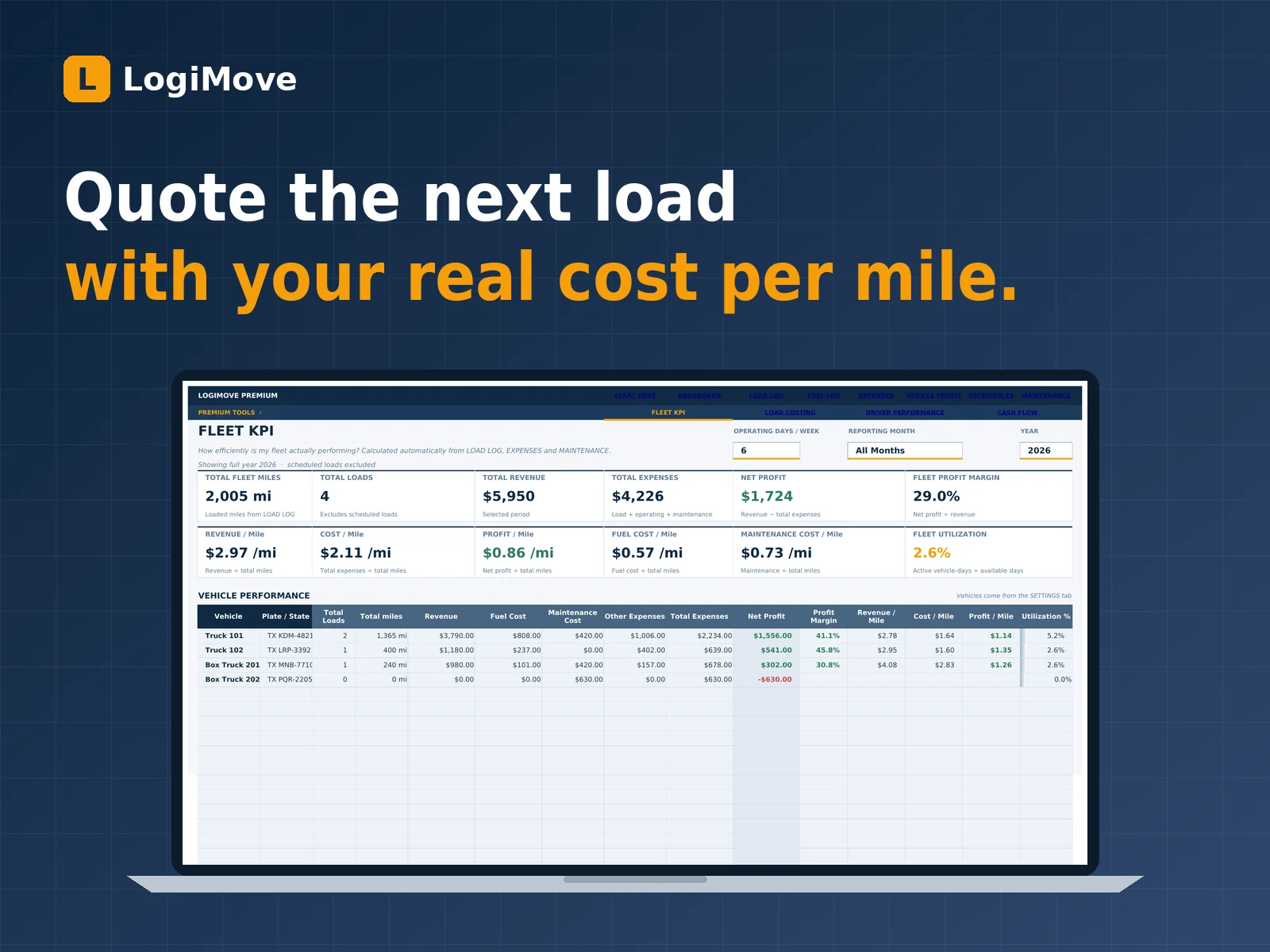
You enter the loaded miles, the revenue and the costs on each load. LogiMove divides revenue and profit by the miles for the period and shows them on the Dashboard. In Premium, Fleet KPI also shows cost per mile, fuel cost per mile and maintenance cost per mile for the fleet and each truck.
Does it file my IFTA return?
No. The IFTA tab totals the gallons you bought by state from your Fuel Log, takes the miles you enter for each state, and works out fleet MPG, taxable gallons and net taxable gallons. It organizes your numbers. It does not know your tax rates, calculate tax due, or file anything, so confirm rates and deadlines with your base jurisdiction. The optional IFTA Quarterly Tax Workbook add-on lets you enter the rates and see tax due or credit by state.
Does it work in Excel and Google Sheets?
LogiMove is built and tested in Microsoft Excel (2016 or newer, Microsoft 365 and Excel for Mac). It's a standard .xlsx with no macros or add-ins. It also opens in Google Sheets and Numbers, but some formatting and tables can behave differently there, so we recommend Excel for the best experience.
Does it replace my TMS, ELD or accounting software?
No, and it's not trying to. It's the profit-and-paperwork layer: what each load made, what each truck earns, who still owes you and what your fuel looked like by state. It doesn't dispatch, track trucks, record hours of service, handle payroll or file taxes. Plenty of small fleets run it next to those tools, or instead of a TMS while they're small.
Will it make sure I'm compliant with DOT, FMCSA or state rules?
No. LogiMove tracks the numbers you enter and includes a pre-trip checklist and guides as general information. It isn't legal, tax, accounting or compliance advice. Rules on IFTA, inspections, driver classification and pay differ by state and by your operation, so check yours. Nothing in the file replaces your attorney, accountant, safety manager or the relevant agency.
What does Future Updates mean?
If you add Future Updates + Priority Support, you get every future version of your LogiMove plan (fixes, new formulas and new tabs for your tier) emailed to you at no extra cost for as long as we offer that plan, plus front-of-the-line email support. It doesn't include custom work or new products. If we ever stop offering your plan or close the site, we can end Future Updates and Priority Support with notice by email, and you keep the files you already downloaded. See our Terms of Service for details.
Is it safe to pay online?
Yes. Payment is handled by Whop, a third-party payment platform, right on our checkout page. Your card details go straight to them and never touch our servers. Everything is priced and charged in US dollars.
How do I get the file after I pay?
You pay on our one-page checkout. Once payment is confirmed, your download links appear on the confirmation page and are emailed to you, usually within a few minutes. Check spam if you don't see it, or email us.
What if it's not right for my business?
Use it on real loads. If it doesn't make your profit, fuel and billing clearer than what you use now, email us within 30 days of purchase for a refund under the Refund Policy.
One-time purchase · 30-day money-back guarantee